AI Smart Glasses in 2026: Are They Finally Worth Buying?
A few years ago, if someone told me that people would be talking to their glasses, taking photos from them and asking AI questions without touching their phone, I probably would have thought it was still a long way away.
But things have changed.
Smart glasses are becoming one of the more interesting gadget categories in 2026. They are not everywhere yet, and I don’t think we are at the point where everyone needs a pair. But the technology has become much more practical than it was a few years ago.
The interesting part is that companies are not all building the same type of smart glasses.
Some are designed to look almost like normal spectacles and focus on AI, cameras, calls and music. Others are adding displays so that information can appear directly in front of your eyes. There are also XR glasses aimed more at gaming, movies and working with large virtual screens.
So, when someone says “AI smart glasses”, it can actually mean several different things.
In this article, we’ll look at what AI smart glasses in 2026 can actually do, which products are getting attention, what their limitations are, and whether buying one makes sense right now.
What Exactly Are AI Smart Glasses?
Let’s start with the simple explanation.
AI smart glasses are normal-looking glasses with additional technology built into them.
Depending on the model, this technology can include cameras, microphones, speakers, Bluetooth, Wi-Fi, AI assistants, sensors and sometimes a small display.
The idea is pretty straightforward: instead of taking your phone out every time you want information, you can interact with technology while keeping your hands free.
For example, imagine you’re walking around a new city.
Instead of constantly checking Google Maps on your phone, you could potentially ask your glasses for directions. Or if you see something you don’t recognize, you could ask an AI assistant about it.
Another example is translation.
You are travelling in another country and someone is speaking a language you don’t understand. Instead of immediately opening a translation app, smart glasses could potentially provide captions or translation while you’re having the conversation.
That is where the idea becomes interesting.
It’s not really about putting a computer on your face just because we can.
It’s about reducing the number of times you have to reach for your phone.
Why Are Smart Glasses Getting So Much Attention?
There are actually several technologies coming together at the same time.
AI has become much better at understanding natural language. Cameras have become tiny and powerful. Wireless connectivity is everywhere. Batteries are improving. And manufacturers have become better at putting electronics into small wearable devices.
But I think the biggest change is AI.
Earlier smart glasses were mostly about notifications, music or basic smartphone controls.
Now you can potentially have an AI assistant sitting with you all day.
That’s a very different proposition.
You don’t have to think about which app to open. You can simply ask a question.
This is also why smart glasses are being discussed alongside the next generation of AI devices. Instead of having AI exist only inside a chatbot on your phone or computer, companies are trying to put it into devices that are always available.
And glasses are an obvious choice because people already wear them.
AI Smart Glasses vs Normal Smart Glasses
The terminology can be confusing.
Not every smart glass product is an AI device.
A basic pair of smart glasses might simply give you:
- Bluetooth audio
- Speakers
- Microphones
- Phone calls
- Music controls
- Notifications
AI smart glasses take things a step further by adding an AI assistant or AI-powered features.
For example, you might be able to ask the glasses a question using your voice.
Some models can also use a camera to understand what you’re looking at.
That opens up another category of possibilities.
You could potentially point the camera toward an object and ask the AI to explain it.
This is where computer vision and generative AI start becoming useful in everyday gadgets.
Do AI Smart Glasses Have a Display?
This is one of the most important things to understand before buying a pair.
No, not all smart glasses have a display.
This surprised me when I first started looking into the category because many people hear “smart glasses” and immediately imagine holograms floating in front of their eyes.
That’s not how many current products work.
Some smart glasses use cameras, microphones and speakers but don’t put information directly in front of your eyes.
You hear the AI response through the built-in speakers.
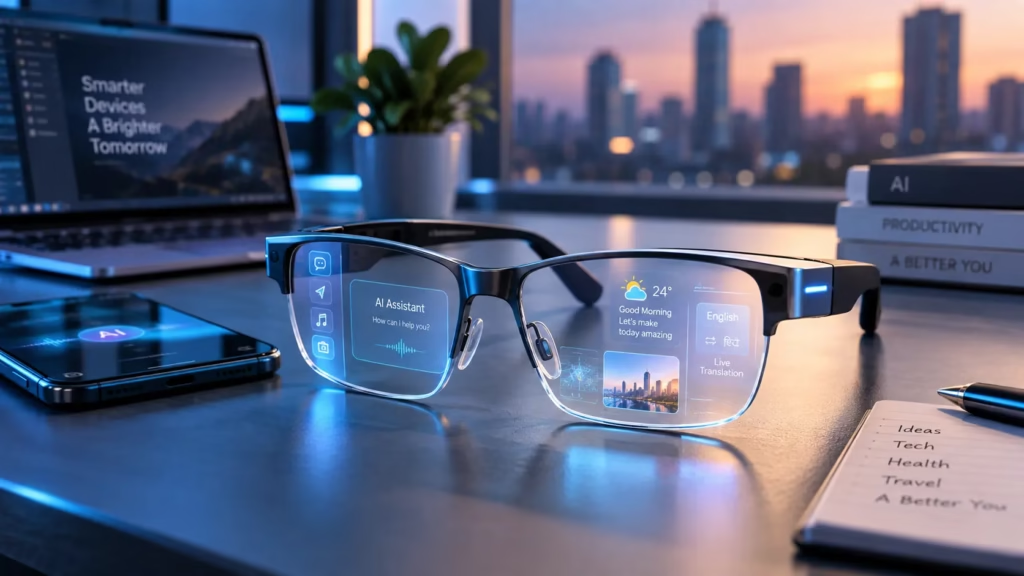
Other products are adding transparent displays.
These can show information such as:
- Text
- Notifications
- Captions
- Navigation information
- Virtual screens
- Images
- Other digital information
So before buying, don’t assume that an AI smart glass automatically means AR.
AI glasses and AR glasses are related, but they aren’t exactly the same thing.
Ray-Ban Meta: The Smart Glasses Most People Know
One of the biggest names in this category is Ray-Ban Meta.
The concept is interesting because the glasses don’t look like a futuristic headset.
They look like regular Ray-Ban glasses.
That matters more than it sounds.
A wearable device can have amazing technology, but if people don’t want to wear it outside their home, it has a problem.
Ray-Ban Meta glasses combine familiar eyewear designs with cameras, microphones and speakers.
You can use them for things such as:
- Taking photos
- Recording videos
- Listening to music
- Making calls
- Voice interaction
- Asking AI questions
- Hands-free content creation
The latest Gen 2 models are listed by Ray-Ban in India in different configurations, with prices depending on the frame and lens option.
You can check the current models directly on the official Ray-Ban India website because prices and availability can change.
Official link: Ray-Ban Meta Gen 2
https://india.ray-ban.com/meta-gen-2-collection-page
One thing I find interesting about this product category is that you don’t necessarily feel like you’re wearing a computer.
That’s probably important if smart glasses are eventually going to become an everyday product.
RayNeo iO Takes a Different Approach
RayNeo is another company worth watching if you’re interested in AI glasses.
The RayNeo iO is particularly interesting because it combines AI features with a transparent display while taking a camera-free approach.
According to RayNeo, the glasses weigh around 33 grams and support features including AI interaction, live captions and a teleprompter.
The company also says the glasses support live captions across 55 languages.
That makes them quite different from camera-based products.
You can check the official product information here:
https://www.rayneo.com/pages/rayneo-io-ai-glasses
The camera-free approach also brings up an important point.
Privacy could become one of the biggest issues for smart glasses.
If everyone around you knows that your glasses have a camera, there may always be a question about whether they are being recorded.
A camera-free design avoids at least part of that problem.
What About XR Glasses?
Then there is another category that is becoming popular: XR glasses.
These products aren’t necessarily designed primarily as AI assistants.
Their main purpose can be creating a large virtual display.
Think about watching a movie on your phone.
The screen is relatively small.
Now imagine connecting your phone, laptop or gaming device to a pair of XR glasses and seeing a large virtual screen in front of you.
That’s the basic idea.
VITURE is one of the companies working in this area.
Its Beast XR glasses are marketed around gaming, streaming and productivity. The company lists features including a high-resolution display, a wide field of view, 3DoF tracking and a large virtual-screen experience.
You can find the official specifications here:
This type of product can be particularly interesting for people who travel frequently.
Imagine sitting on a flight with a laptop or handheld gaming device and having your own large private screen.
That’s a much more practical use case than simply saying, “Look, I have smart glasses.”
What Can You Actually Do With AI Smart Glasses?
This is probably the question most people have.
Let’s look at some realistic use cases.
1. Ask an AI Assistant Questions
This is probably the most obvious feature.
Instead of typing, you can talk.
You might ask:
“What’s the weather today?”
“Explain this word.”
“How do I get to the railway station?”
“What is this object?”
“Translate this sentence.”
The exact capabilities depend on the device, software and region.
The important change is that AI becomes hands-free.
2. Take Photos Without Using Your Phone
Camera-equipped glasses can capture photos from your point of view.
This can be useful when you’re travelling.
You’re walking through a beautiful location and see something interesting.
Instead of taking your phone out, unlocking it and opening the camera, you can potentially use the glasses.
This can also be useful for creators who want first-person footage.
Of course, there’s a downside.
You need to be careful about recording people without their knowledge or in places where recording isn’t appropriate.
The fact that a camera is small doesn’t make privacy less important.
3. Listen to Music
Some smart glasses have built-in open-ear speakers.
This is different from wearing traditional earbuds.
You can listen to music or a podcast while still hearing some of the surrounding environment.
For walking or general everyday use, that can be convenient.
But audio quality varies significantly between products, so I wouldn’t buy glasses only because the manufacturer says they have “premium audio.”
4. Make Phone Calls
Microphones and speakers allow some smart glasses to function as a hands-free calling device.
For people who make lots of calls during the day, this can be useful.
You don’t have to hold the phone next to your ear.
Again, microphone quality matters.
There’s a big difference between making a call in a quiet room and making one while walking beside a busy road.
5. Translation
Translation could become one of the best use cases for smart glasses.
Imagine visiting Japan, France or Germany and seeing translated text or captions while interacting with people.
You wouldn’t need to constantly look down at your phone.
Products such as RayNeo iO are already promoting live caption and translation-style experiences.
The technology is not perfect, though.
Background noise, accents, internet connectivity and language support can all affect the result.
So I would treat smart-glass translation as a helpful tool rather than something you should blindly depend on.
6. Navigation
Navigation is another area where AR displays could become really useful.
Imagine walking through a large unfamiliar city.
Instead of checking your phone every few minutes, directions could potentially appear in your field of view.
Something as simple as:
Turn left
or
200 metres →
could make walking navigation much more natural.
We’re not quite at the point where every pair of smart glasses gives you perfect AR navigation, but the direction of the technology is clear.
7. Productivity
This is where things get particularly interesting for people who work with computers.
XR glasses can potentially give you a large virtual display while you’re sitting in a small space.
You could theoretically have:
- A browser window
- A coding window
- A chat window
- Documentation
all available through a virtual workspace.
For someone travelling with only a laptop, this could be useful.
Instead of carrying a large monitor, the glasses can act as a portable display.
Of course, comfort becomes important here.
Wearing any glasses for five minutes is easy.
Wearing them for several hours is a completely different test.
Are AI Smart Glasses Good for Developers and Engineers?
I think this is an area that doesn’t get enough attention.
Developers and engineers constantly look up information.
Imagine working on a machine and being able to ask:
“Show me the Modbus register for this parameter.”
Or:
“What does this error code mean?”
Or:
“Explain this component.”
In the future, computer vision combined with AI could make this kind of workflow much more useful.
For field engineers, maintenance teams and technicians, wearable AI could potentially reduce the need to constantly switch between the physical equipment and a phone or laptop.
This is still an emerging use case, though.
I wouldn’t buy a consumer smart-glasses product today expecting it to completely replace a professional industrial AR system.
Those are two very different markets.
The Biggest Problem With Smart Glasses: Battery Life
Here is where the futuristic idea meets reality.
AI requires processing.
Cameras require power.
Displays require power.
Wireless connectivity requires power.
And all of that has to fit into a small pair of glasses.
That’s not easy.
A smartphone has a large battery because there is physically enough space inside it.
Glasses don’t have that luxury.
So battery life is one of the specifications I would check carefully before buying.
Don’t only look at the number provided by the manufacturer.
Look for real-world reviews.
Ask:
- How long does it last with normal use?
- How much does camera recording reduce battery life?
- How quickly does it charge?
- Is there a charging case?
- Can the glasses be used while charging?
These questions are much more useful than simply looking at a processor name.
Privacy Could Decide the Future of Smart Glasses
This is probably the biggest issue I see with camera-equipped AI glasses.
Imagine sitting in a restaurant.
Someone across the table is wearing glasses with a camera.
You don’t necessarily know whether they’re recording.
Now imagine this becoming normal.
The technology may be impressive, but social acceptance becomes another challenge.
Manufacturers have already added visual indicators and privacy features to some products, but technology alone cannot solve every social problem.
Users also need to behave responsibly.
Don’t record people in private situations.
Don’t assume that because you can technically record something, you should.
And always follow the laws and rules applicable where you’re using the device.
This is one reason camera-free smart glasses are interesting.
They could offer some smart functionality without the same level of concern around continuous visual recording.
Are Smart Glasses Comfortable?
This sounds like a small issue until you actually wear them.
They’re sitting on your nose and ears all day.
So comfort matters.
When comparing smart glasses, look at:
- Weight
- Frame size
- Nose-pad design
- Lens options
- Prescription support
- Balance
- Heat generation
A pair of glasses that weighs a little more might not sound like a problem.
But after several hours, you may notice it.
For people who already wear prescription glasses, compatibility is especially important.
Before buying, check whether the manufacturer supports prescription lenses or compatible lens inserts.
Should You Buy AI Smart Glasses in 2026?
There isn’t one answer for everyone.
If you’re interested in new technology and want hands-free AI, calls, audio and cameras, current AI glasses can be genuinely interesting.
If you want a virtual giant screen for gaming and movies, XR glasses may make more sense.
If you’re expecting something like the glasses shown in science-fiction movies, you may still be disappointed.
We’re getting closer, but we’re not quite there.
The current generation is more practical than magical.
And honestly, that’s probably a good thing.
Technology usually becomes useful when it solves small everyday problems rather than trying to replace everything at once.
Things to Check Before Buying AI Smart Glasses
Before spending your money, I’d recommend checking these points.
AI assistant
Find out which AI model or assistant the glasses use and whether the feature is available in your country.
Smartphone compatibility
Check Android and iPhone compatibility.
Camera
If you’re buying a camera-equipped model, check video quality, storage and privacy features.
Display
Don’t assume every smart glass has an AR display.
Battery
Look for independent reviews and real-world battery tests.
Weight
Try to choose a model that you can comfortably wear for several hours.
Prescription lenses
If you wear prescription glasses, verify compatibility before ordering.
Warranty
This is especially important when buying an imported gadget.
App support
Smart glasses are heavily dependent on their companion app. Make sure the app is available and supported on your phone.
Price
Don’t compare products only by specifications.
A cheaper product isn’t automatically better value if software support, warranty or accessories are poor.
What I Think the Future of AI Glasses Looks Like
The really interesting version of smart glasses is probably still ahead of us.
Imagine a pair of glasses that understands your surroundings and knows what you’re trying to do.
You’re at an airport.
The glasses show your gate.
You’re looking at a menu.
The glasses translate it.
You’re repairing a machine.
The AI explains the component you’re looking at.
You’re walking through a new city.
The glasses give you directions.
You’re working on your laptop.
The glasses give you multiple virtual monitors.
And you can control much of this simply by talking.
That’s the long-term vision.
But there are still major challenges to solve.
Battery life needs to improve.
Displays need to become better.
AI needs to become faster and more reliable.
Privacy needs to be taken seriously.
And most importantly, the glasses need to remain comfortable.
If those problems are solved, smart glasses could become much more important than they are today.
Final Verdict: Are AI Smart Glasses Worth It?
AI smart glasses are no longer just a concept for the future.
In 2026, there are already several products offering useful combinations of AI, cameras, audio, displays and XR features.
But the market is still young.
A pair of smart glasses can be an excellent gadget for someone who enjoys experimenting with new technology, wants hands-free AI or needs a portable virtual display.
For someone who simply wants notifications and music, a smartwatch or earbuds may be enough.
That’s why I wouldn’t recommend buying smart glasses just because they’re trending.
First decide what you actually want from them.
If you want an AI assistant and hands-free camera, look at AI-focused glasses.
If you want a large virtual display, look at XR glasses.
If you want both, you’ll need to carefully compare the available products and understand the compromises.
The good news is that the category is moving quickly.
What feels expensive and experimental today could become a completely normal gadget category in the next few years.
And if AI continues becoming more capable, the glasses sitting on your face may eventually become one of the easiest ways to interact with it.
Frequently Asked Questions About AI Smart Glasses
What are AI smart glasses?
AI smart glasses are wearable glasses that combine traditional eyewear with technologies such as artificial intelligence, microphones, speakers, cameras, wireless connectivity and, in some models, a transparent display.
Do AI smart glasses have a camera?
Some do and some don’t. Camera-equipped models can take photos, record video and provide computer-vision features. Camera-free models focus on other functions such as audio, AI and displays.
Do all smart glasses have AR displays?
No. Many smart glasses don’t have a visual display at all. Some primarily provide audio, cameras and AI features, while AR/XR glasses add a display.
Can AI glasses replace a smartphone?
Not at the moment. Smartphones are still much more capable for apps, typing, browsing and complex tasks. Smart glasses are better viewed as a companion device.
Can smart glasses translate languages?
Some models support translation and live captions. The exact languages and features depend on the product and software.
Are AI smart glasses available in India?
Yes, some products are officially available in India, while other models may need to be imported. Buyers should check official availability, warranty and pricing before purchasing.
How much do AI smart glasses cost?
Prices vary significantly depending on the product. Basic smart glasses can be relatively affordable, while premium AI and XR glasses can cost considerably more. Prices also vary by country and configuration.
Are AI smart glasses useful for gaming?
Some smart glasses are designed specifically for gaming. XR glasses can provide a large virtual display, making them particularly interesting for handheld gaming and portable entertainment.
Are smart glasses safe?
Smart glasses are generally designed to be worn like other wearable electronics, but users should consider factors such as comfort, battery heat, privacy and responsible camera use.
Are AI smart glasses worth buying in 2026?
It depends on your use case. They can be useful for hands-free AI, calls, audio, photography, translation and XR displays, but they are still developing and don’t replace smartphones or laptops.
Official Resources
For readers who want to check the products mentioned in this article, these are the official manufacturer pages:
Ray-Ban Meta Gen 2:
https://india.ray-ban.com/meta-gen-2-collection-page
RayNeo iO:
https://www.rayneo.com/pages/rayneo-io-ai-glasses
VITURE Beast:
https://www.viture.com/beast
IDC India:
https://www.idc.com/resource-center/blog/resource-region/3_332/
.